
Johnson County 72 Hour Release Workaround
The Johnson County Sheriff’s Booking and Release Report opens to “Last 24 Hours.” No separate 72-hour URL or one-click control was located. A three-day review therefore requires the default rolling report plus the applicable earlier calendar-day buttons. This is a three-report workaround, not a claim that Johnson County publishes a rolling 72-hour feed.
This broader method catches releases that can be easy to overlook after a weekend. It also supplies a dated path when a same-day result has already aged out of the default view. The event still must be interpreted: release from Central Booking or New Century may mean bond, completion, court-authorized exit, or transfer under another authority.
Check Johnson County 72 Hour Releases
Choose the views by the actual hours and dates in question. Do not simply search three buttons and label the result an exact 72-hour dataset. The following method preserves the Sheriff’s real interface.
- Open the official report and review the Released block in the default Last 24 Hours view.
- Note the current time, then identify which two or three prior calendar dates overlap the remaining part of the period.
- Select each relevant dated button and search its Released entries.
- Match the person using the booking number, CFN, booking date, or other suitable identifiers, not name alone.
- Write down the release date and time so an entry seen in overlapping views is not counted twice.
- Read release type and location to determine whether the event appears to be a community exit or custody handoff.
- For an event near the report’s edge or within the stated delay, call the facility before drawing a current-status conclusion.
If the expected event is strictly same-day, the Johnson County Jail Releases: 24 Hours page explains the default view without the extra dated slices.
Note: Save the exact timestamp and selected date, since the rolling report changes and the dated controls serve a different function.
Fields Across Johnson County Dated Releases
The same official field structure supports both the default and dated reports. Identity and booking fields help locate the right episode. Release fields explain the actual exit, while charge and bond fields provide legal context that should not be mistaken for physical-release proof.
| Field group | How to use it in a three-day check |
|---|---|
| Name and demographics | Distinguish people with similar names while avoiding needless republication of private details. |
| CFN and booking number | Connect one release row across views and identify the booking in a records request. |
| Booking and arrest data | Confirm which custody episode is represented and which agency made the arrest. |
| Release date and time | Place the exit inside or outside the actual period being reviewed. |
| Release type | Describe the administrative event without guessing from the charge or bond. |
| Release location | Help separate a door-out release from movement to another place or authority. |
| Charges, disposition, bond, warrant | Supply case context, but do not independently prove that detention ended. |
| Mugshot control | Offer an image when populated; the photo does not show present custody. |
The capture below was made from the Johnson County Booking and Release Report, the single official endpoint used for both rolling and dated checks.
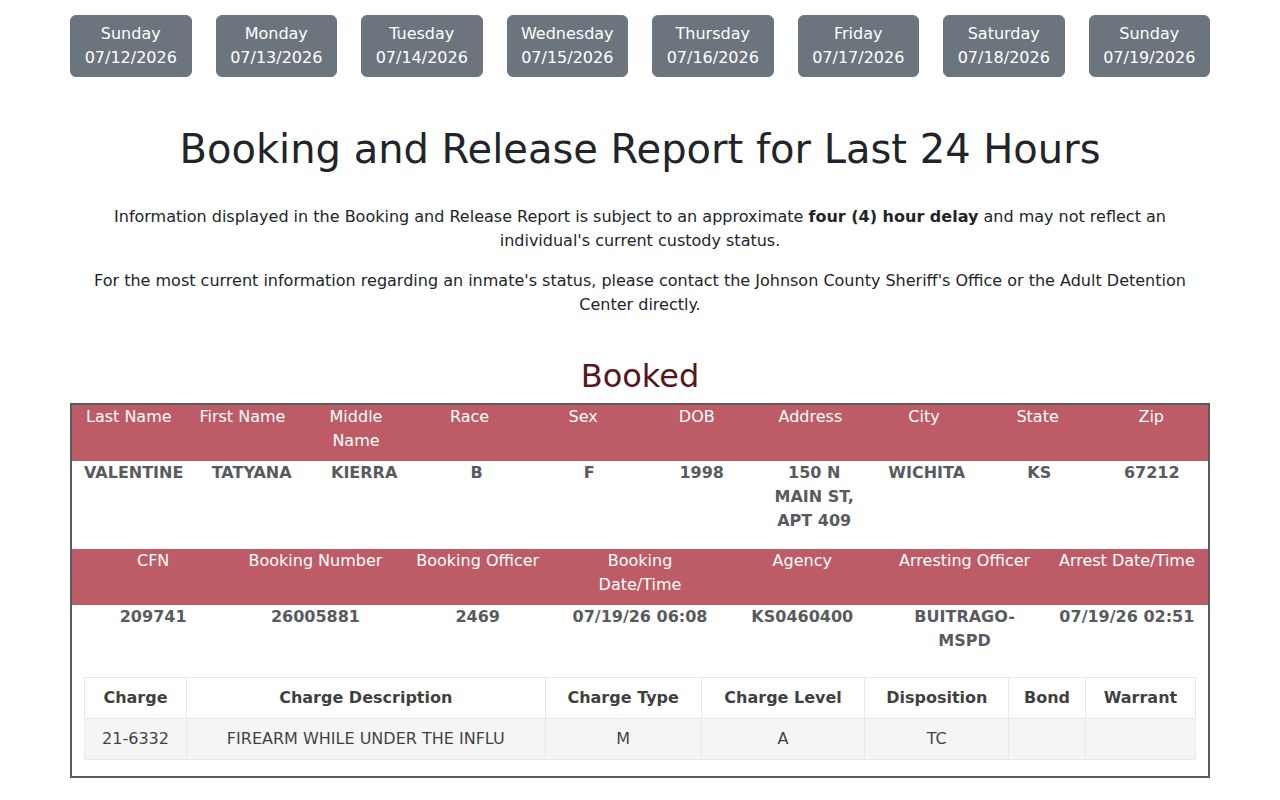
Use the live source to select the dates relevant to the period under review. The screenshot documents access and layout, not a permanent release archive.
Johnson County Weekend Release Review
A Monday search often spans parts of Friday, Saturday, Sunday, and Monday depending on the exact hour. The default rolling report may overlap yesterday, while the dated buttons isolate calendar days. That is why “last three days” and “last 72 hours” cannot be treated as interchangeable labels in this interface.
The Sheriff also discloses an approximate four-hour delay. A Sunday-night exit may not be visible when checked soon afterward. No special holiday publication schedule is stated by the Sheriff, so use direct facility confirmation for a fresh event and return to the report after the delay.
Johnson County Release Retention and Lag
The Sheriff interface reaches back through the previous seven calendar dates. That is a visible access feature, not a permanent retention promise. When the daily views no longer cover the event, the official Inmate Search provides “Show Previous Booking History.” Central Records is the next source for an existing booking and custody-event record.
The report’s four-hour warning also limits negative findings. No matching row can mean the event has not posted, lies in another dated slice, uses different identifiers, occurred outside Johnson County, or did not happen. No name in the current roster can mean release or transfer, but can also mean mismatch or no county booking.
Note: Online letters of incarceration cover three prior years, but that limit does not establish destruction of the underlying Sheriff record.
Johnson County Release Versus Transfer
The release date and time answer when the Sheriff recorded the exit. Release type and location help answer where custody went next. A transfer to KDOC, another county, USMS, or ICE ends physical custody at the Johnson County facility but does not place the person in the community.
| Later system | Correct next check |
|---|---|
| Johnson County only | Sheriff release row, direct facility confirmation, court authority, or Central Records. |
| Kansas state corrections | KASPER status and KDOC confirmation. Parole is supervision; Discharged is the stronger final-state label. |
| Federal prison | BOP locator and record definitions. A RELEASED location means no longer in BOP custody, not necessarily free of supervision. |
| Federal pretrial custody | District of Kansas docket and USMS contact because there is no comparable public USMS release locator. |
| Immigration custody | ICE ODLS for current detention. A no-result is not historical release proof. |
These systems answer different questions. A Sheriff release followed by KASPER “Inmate” can be a coherent transfer record, not a conflict.
Older Johnson County Release Records
When the dated views expire, open the official Sheriff Inmate Search, enter first and last name, and select “Show Previous Booking History.” The standard search is for current custody; the extra option is what retrieves past booking and release information. If that path is incomplete, request the existing record from Central Records.
A narrow request should identify the full name and approximate booking date, plus a booking number or CFN when known. Ask for booking and release dates and times, release type or authority, release location, and the receiving agency if transfer is possible. Request nonexempt portions with lawful redaction and an electronic estimate.
Central Records accepts requests in person, by email, or by mail and lists SHR-Recordrequests@jocogov.org and 913-715-5460. KORA requires a response or detailed delay explanation by the end of the third business day when immediate access is unavailable; it does not promise universal production by then.
Verify a Johnson County Three-Day Result
Use the custodian that created the event. Central Booking can address a booking-stage exit; New Century can address its detention release; Central Records holds Sheriff-generated records. A court bond, dismissal, sentence, or journal entry explains legal authority but usually not the minute the person physically left.
- Confirm the row’s booking identifiers and exact release timestamp.
- Read type and location before calling it community release.
- Call Central Booking at 913-715-5100 or New Century at 913-715-5900 for time-sensitive status.
- Use Kansas VINE as a county-jail alert layer, not as certified historical proof.
- Switch to KASPER only for KDOC involvement and to federal tools only for the correct federal authority.
For a named-person investigation that also reconciles court, state, and federal sources, use the Johnson County released inmates search guide. It is broader than this date-window method.